 Isolatedd
 Support & troubleshooting
Create and follow a support ticket
Start a private conversation in Contact Center.
Updated October 10, 2026
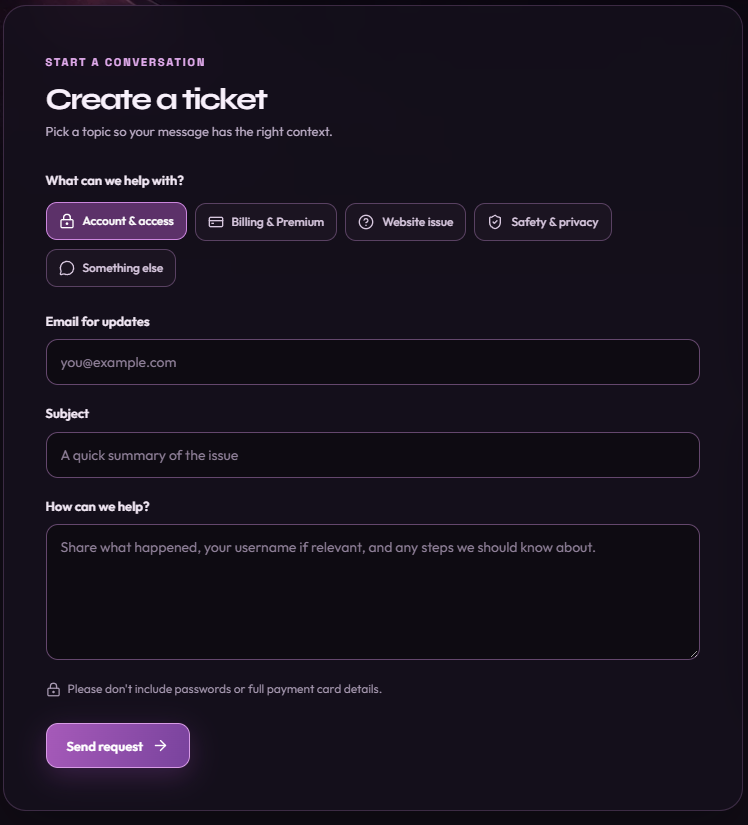
Create a ticket
Open contact.isolatedd.xyz and use Create a ticket. Describe the issue with enough detail to reproduce it; screenshots help when a page behaves unexpectedly.
- Choose a topic and enter your email.
- Write a short subject and a clear description of what happened.
- Submit the form and keep the ticket reference in your confirmation email.
See the conversation
Use the email sign-in code in Contact Center to open My tickets. Your ticket conversation and staff replies stay in that portal; you can reply from there.
Note
A ticket link alone is not the sign-in method. Use the email address associated with the ticket.
Reply by email
You can reply directly to a ticket update email. Keep the ticket reference in the subject so your response is added to the correct conversation. Updates are also sent to your email.