 Isolatedd
 Profile guides
Use Premium card layouts
Choose a layout and adjust card borders, banner, and animation.
Updated October 10, 2026
Choose a card layout
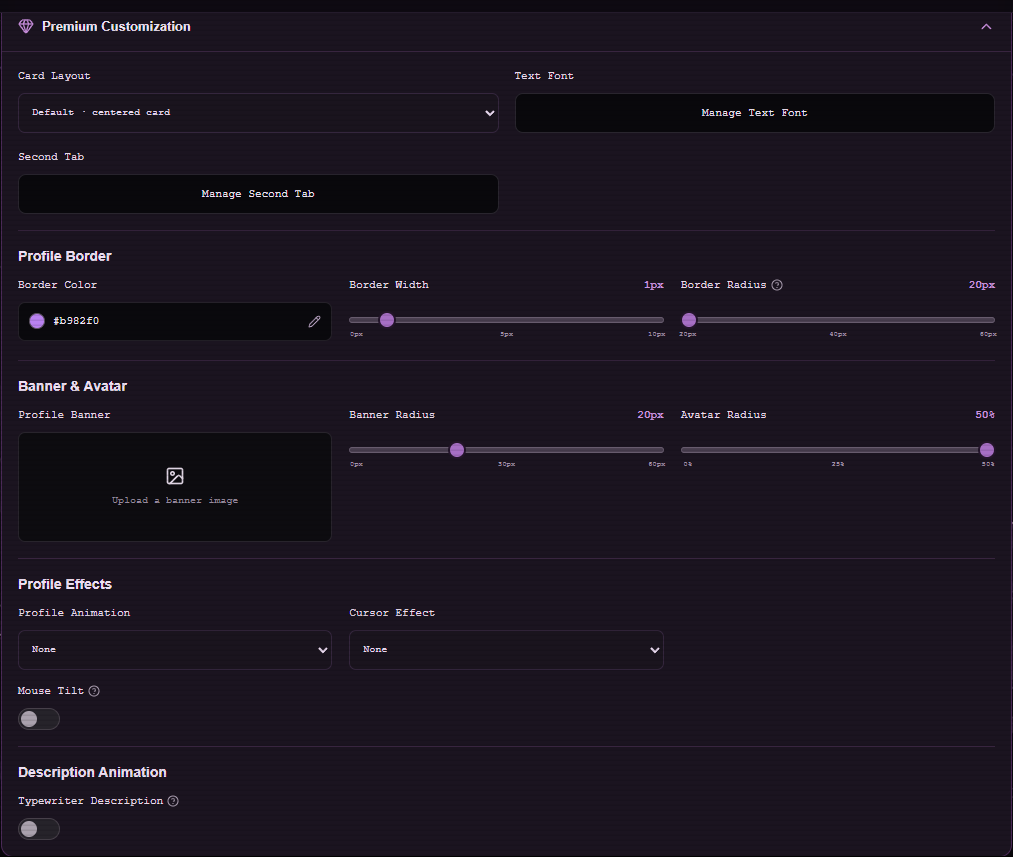
With Premium active, open Customize Profile → Premium Customization → Card Layout. The editor offers Default, Modern, Simplistic, and Sleek layouts.
- Expand Premium Customization.
- Choose a Card Layout.
- Save Changes and open My Page to compare the result.
Refine the card
Profile Border adjusts color, width, and corner radius. Banner & Avatar controls add a banner image and adjust radii. Profile Effects controls the entrance animation and cursor effects.
Note
Some settings look different across layouts; always preview the page at phone width.
Use a second tab
The Second Tab control lives in the same Premium section. It can point to a supported platform or show Favorite Games. A separate guide covers setup.